Filter System
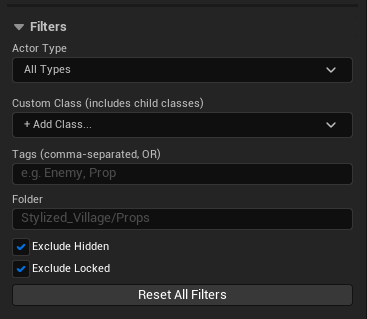
The filter system controls which actors are eligible for selection. Filters are applied before the volume or marquee test — actors that fail a filter are never selected, even if they are inside the volume.
Class Filter
Restrict selection to specific actor types.
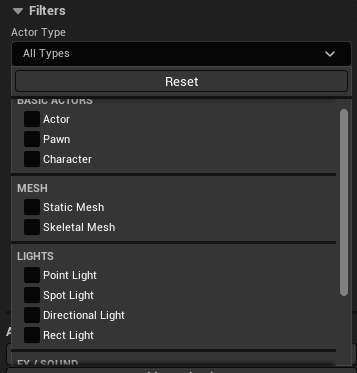
Presets
A dropdown provides quick access to common classes:
| Category | Classes |
|---|---|
| Basic | Actor, Pawn, Character |
| Mesh | StaticMeshActor, SkeletalMeshActor |
| Lights | PointLight, SpotLight, DirectionalLight, RectLight |
| FX / Sound | AmbientSound, NiagaraActor |
| Misc | CameraActor, TriggerBox |
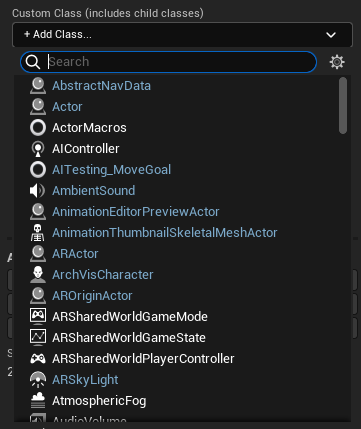
Custom class
Use the class picker below the dropdown to add any AActor subclass from your project.
Multiple classes can be added — an actor matches if it belongs to any of the listed classes.
Click Reset to clear all class filters.
Leaving the class filter empty means all classes are allowed.
Tags Filter
Filter by Actor Tags (set in the Actor's Details panel under Tags).
- Enter tags as a comma-separated list:
Enemy,Prop,Interactive - An actor matches if it has at least one of the listed tags (OR logic)
- Tags are trimmed of whitespace automatically
Folder Filter
Filter by the Content Browser path of the actor's mesh asset.
- Enter a partial folder path, e.g.:
Stylized_Village/Props - The plugin searches for
/Game/Stylized_Village/Props/in the asset path - Applies to actors with a StaticMeshComponent or SkeletalMeshComponent
- Actors with no mesh component will not match this filter
Leaving the folder filter empty means no folder restriction is applied.
Exclude Hidden
Enabled by default.
When checked, actors with IsHiddenEd() == true (hidden in the editor) are excluded from selection.
Uncheck to include hidden actors in the selection.
Exclude Locked
Enabled by default.
When checked, actors with IsLockLocation() == true (locked transform) are excluded.
Uncheck to include locked actors.
Always excluded actors
Regardless of filter settings, the following actor types are never selected:
AWorldSettingsABrushADirectionalLight(direct instances)ASkyLight- Instanced Foliage actors
- SkyAtmosphere actors
- SkySphere actors
- Landscape actors
Reset All Filters
Click Reset All Filters at the bottom of the filter section to restore all filters to their defaults:
- Class filter: cleared
- Tags: cleared
- Folder: cleared
- Exclude Hidden: on
- Exclude Locked: on