Claude Assistant
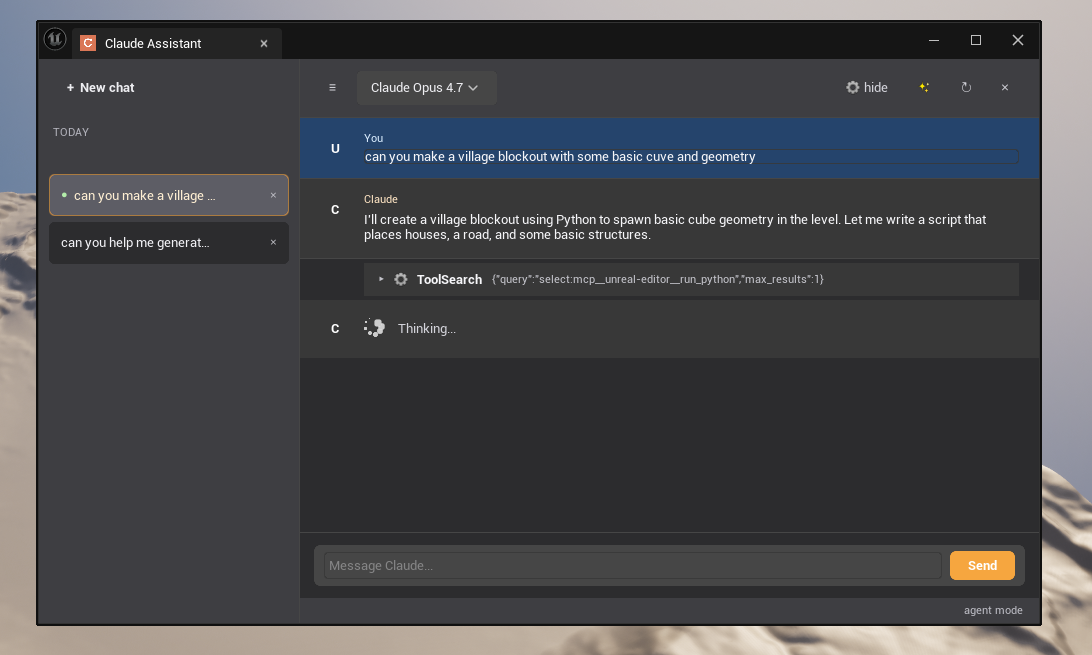
Claude Assistant integrates Anthropic's Claude AI directly into the Unreal Engine editor, giving you an AI pair programmer that understands your project — your Blueprints, your DataTables, your assets.
Version: 0.1.0 · Engine: UE 5.3+ · Platform: Win64, Linux
What it does
Instead of switching back and forth between your editor and a browser, Claude Assistant lets you ask questions and issue commands directly from within Unreal Engine. Claude can read your open assets, inspect Blueprint graphs, analyze DataTable schemas, and even make changes — all without leaving the editor.
Key Features
Two operation modes
| Mode | Best for |
|---|---|
| Claude Code (subprocess) | Full power: tool calling, prompt caching, MCP protocol |
| Direct API | Simple setup: just paste your API key, no CLI required |
Context-aware conversations
Claude automatically detects which asset you have focused — open a Blueprint, switch to a DataTable, Claude knows. No copy-pasting node names or struct fields.
Read your project
- List Blueprint member variables, functions, event graphs, macro graphs
- Inspect individual graph nodes and their connections
- Read DataTable schemas and row data (paginated)
- Identify unused variables
Modify your project (with confirmation)
- Add, rename, or delete Blueprint variables
- Clean up unused variables in one shot
- Add/update/delete DataTable rows (single or batch)
- Reposition Blueprint nodes and add comment boxes
- Execute Python scripts for bulk operations
Persistent conversations
Every conversation is saved under Saved/Config/UCA/conversations/. Pick up where you left off, switch between conversations from the sidebar, or run sessions in the background while you keep working.
Works everywhere in the editor
The Claude button appears in the toolbar of:
- Blueprint Editor, Widget Blueprint Editor
- DataTable Editor
- Material, Material Function, Material Instance Editors
- Niagara System & Emitter Editors
- Animation Blueprint & Animation Editors
- Skeletal Mesh & Static Mesh Editors
- Level Sequence, Sound Cue, Behavior Tree, Control Rig Editors
- Level Editor play toolbar
Supported Models
| Model | ID |
|---|---|
| Claude Opus 4.7 | claude-opus-4-7 |
| Claude Sonnet 4.6 | claude-sonnet-4-6 |
| Claude Haiku 4.5 | claude-haiku-4-5-20251001 |
Switch models at any time from the chat panel toolbar.
Next steps
- Install the plugin — add it to your project
- Get started — open the panel and send your first message
- Configure — choose your mode and set your API key