C++ SDK Generator
The C++ SDK Generator lets you export your Blueprint public API as C++ headers, so other developers can reference your game's types and functions without needing your full source code.
What It Does
ModKit analyzes your Blueprint classes and generates:
- Public
.hheaders — function declarations, structs, enums - Private
.cppstubs — empty implementations for compilation - Module scaffolding —
Build.cs, module registration files
The output is a standalone C++ module that modders can include in their mod projects.
Opening the Generator
From the Editor toolbar: ModKit → Generate C++ SDK
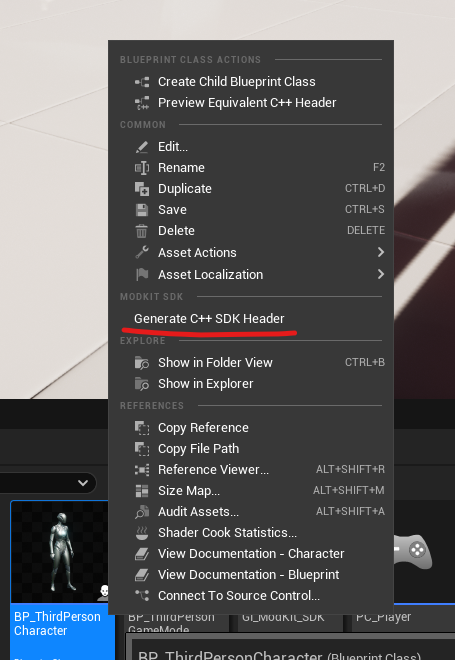
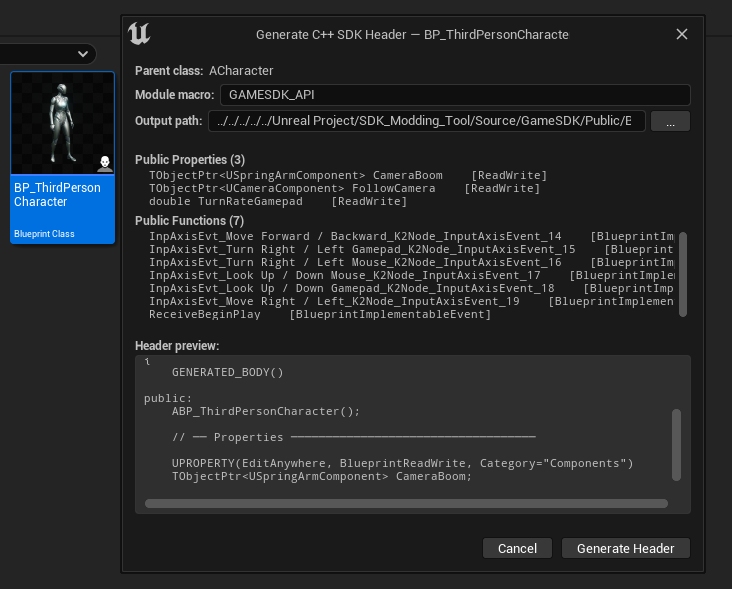
Generator Dialog
- Select Blueprints — choose which Blueprint classes to export
- Output Directory — where to write the generated headers
- Module Name — name for the generated C++ module (e.g.,
MyGameSDK) - Click Generate
What Gets Exported
The generator analyzes each Blueprint and extracts:
BlueprintCallablefunctions with their signaturesBlueprintPurefunctionsBlueprintImplementableEventandBlueprintNativeEventdeclarationsStructdefinitions (all fields)Enumvalues
Functions and properties marked as private or editor-only are excluded.
Example Output
For a Blueprint class BP_GameManager with a RegisterItem function, the generator produces:
// MyGameSDK/Public/BP_GameManager.h
// Auto-generated by ModKit C++ SDK Generator — do not edit
#pragma once

#include "CoreMinimal.h"
#include "UObject/Interface.h"
#include "BP_GameManager.generated.h"

UCLASS(BlueprintType)
class MYGAMESDK_API UBP_GameManager_SDK : public UObject
{
    GENERATED_BODY()

public:
    /** Register a new item with the game registry. */
    UFUNCTION(BlueprintCallable, Category = "Game|Items")
    static void RegisterItem(FName ItemId, UItemDefinition* Definition);

    /** Returns the current player count. */
    UFUNCTION(BlueprintPure, Category = "Game|Session")
    static int32 GetPlayerCount();
};
Distributing to Modders
After generating:
- Zip the output directory
- Upload it to your mod community (Discord, GitHub, itch.io)
- Modders add the module as a dependency in their mod's
Build.cs:
PublicDependencyModuleNames.AddRange(new string[] {
    "MyGameSDK",
    "ModKitCore",
});
IModKitGameInterface
Beyond the generated SDK, you can expose a custom game interface to C++ mods by implementing IModKitGameInterface in your game:
class MYGAME_API UMyGameInterface : public UObject, public IModKitGameInterface
{
    GENERATED_BODY()

public:
    virtual bool RegisterItem(const FName& ItemId, UObject* ItemData) override;
    virtual bool RegisterMap(const FName& MapId, const FSoftObjectPath& MapPath) override;
    virtual void LogModMessage(const FString& ModId, const FString& Message) override;
};
Register the instance before calling StartLoadMods() (which takes no arguments):
UMyGameInterface* GameInterface = NewObject<UMyGameInterface>();
ModLoader->SetGameInterface(GameInterface);
ModLoader->StartLoadMods();
The interface is delivered to C++ mods via IModKitMod::OnModLoaded(). C++ mod loading is
not active yet (mods declaring native modules are rejected — see Security), so
today the interface is mainly a forward-looking contract.
Only expose what mods strictly need through IModKitGameInterface. The interface is your contract — every addition is a long-term commitment.