Multiplayer
ModKit includes a mod verification system for multiplayer games. The goal is consistency — ensuring all players in a session have the same mods loaded — not anti-cheat.
The system is honest-client consistency: clients self-report their mod manifest, the server compares and kicks on mismatch. A malicious client could lie about hashes. Gameplay integrity for replicated actors relies on server authority, not on client verification.
How It Works
Client                                    Server
└─ BeginPlay (PlayerController)
   └─ ServerSubmitManifest() ──RPC──────> Diff client vs required mods
                                          │
                               Match ─────> ClientHandshakeResult(true)
                                          │
                               Mismatch ──> ClientHandshakeResult(false, Diff)
                                             └─ KickPlayer() after delay
The handshake runs once at join. Post-handshake mod changes (enable/disable) are locked for the duration of the session.
Setup
1 — StartLoadMods Before PlayerController
StartLoadMods() must complete on both server and client before any PlayerController::BeginPlay runs.
A typical flow: both the listen server and the client load their mods from the main menu, before the session is created or joined. Only once OnAllModsLoaded fires do they proceed to host or join.
Main Menu (Listen Server)          Main Menu (Client)
└─ StartLoadMods()                 └─ StartLoadMods()
   └─ OnAllModsLoaded                 └─ OnAllModsLoaded
        └─ Create Session                  └─ Join Session
             └─ PlayerController               └─ PlayerController
                  └─ BeginPlay                      └─ BeginPlay
                       └─ Handshake ◄──────────────────┘
2 — Attach ModHandshakeComponent to PlayerController
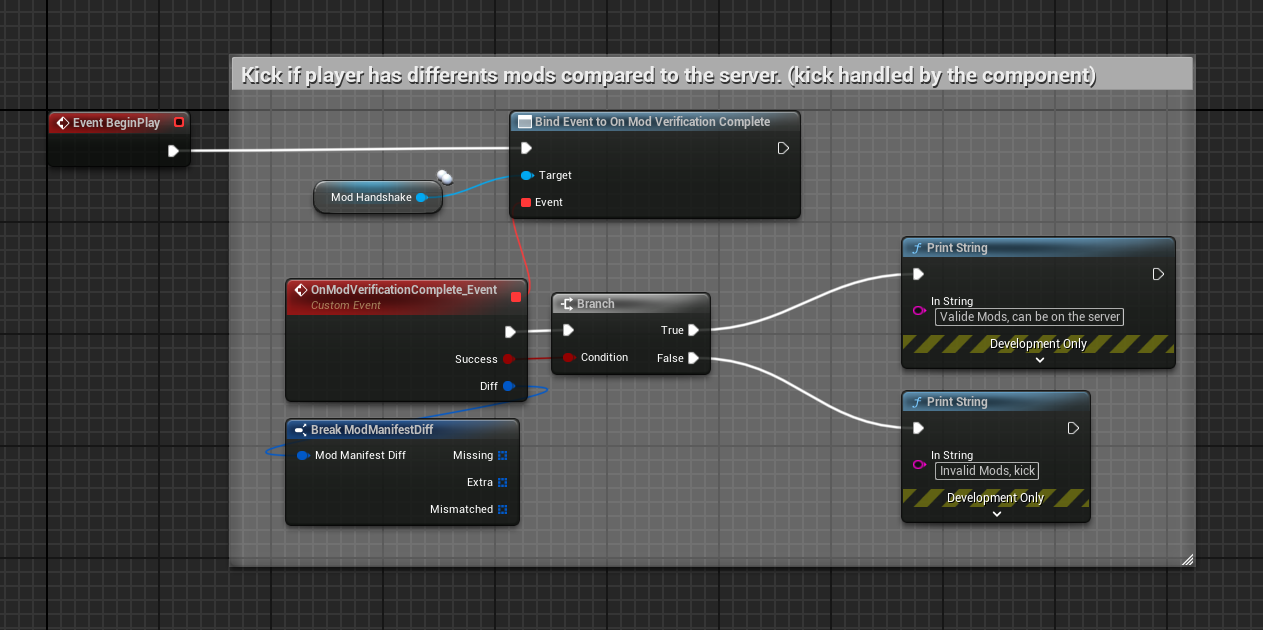
Add UModHandshakeComponent to your PlayerController class:
#include "ModHandshakeComponent.h"

AMyPlayerController::AMyPlayerController()
{
    HandshakeComponent = CreateDefaultSubobject<UModHandshakeComponent>(TEXT("ModHandshake"));
}
The component replicates automatically and drives the full handshake flow on BeginPlay.
3 — Bind the Result Delegate
HandshakeComponent->OnModVerificationComplete.AddUObject(
    this, &AMyPlayerController::OnModVerificationComplete);
void AMyPlayerController::OnModVerificationComplete(bool bSuccess, FModManifestDiff Diff)
{
    if (!bSuccess)
    {
        // Show mismatch UI to player before kick
        // Diff.Missing  — mods required by server that client doesn't have
        // Diff.Extra     — mods client has that server doesn't require
        // Diff.Mismatched — mods present on both but with different versions/hashes
    }
}
The delegate fires on both server and client when verification completes.
FModManifestDiff
Result of comparing two mod manifests:
| Field | Type | Description |
|---|---|---|
Missing | TArray<FModNetworkEntry> | Server requires these mods — client doesn't have them |
Extra | TArray<FModNetworkEntry> | Client has these mods — server doesn't require them |
Mismatched | TArray<FModNetworkEntry> | Present on both but version or hash differs |
IsMatch() | bool | Returns true if all three arrays are empty |
FModNetworkEntry
Each entry in a manifest:
| Field | Type | Description |
|---|---|---|
ModId | FString | Unique mod identifier |
Version | FString | SemVer string from ModDescriptor.json |
PakHash | FString | MD5 hash computed at mount time |
UModNetworkSubsystem
GameInstance subsystem that builds and compares manifests. Available for advanced use:
UModNetworkSubsystem* NetSub = GetGameInstance()->GetSubsystem<UModNetworkSubsystem>();

// Build the local manifest (all loaded mods, sorted by ModId)
FModNetworkManifest Local = NetSub->BuildLocalManifest();

// Compare client manifest against server's required set
FModManifestDiff Diff = NetSub->DiffAgainst(ServerManifest);

// Or use the static method directly
FModManifestDiff Diff = UModNetworkSubsystem::DiffManifests(ClientManifest, ServerManifest);
UModHandshakeComponent Settings
| Property | Default | Description |
|---|---|---|
KickDelaySeconds | 1.0 | Delay before kicking a client after a failed handshake — gives time to display a message |
Content Registry Network Guards
UModContentRegistry automatically skips actor respawn logic on clients:
RespawnActorsForClassOverrides()— server onlyOnActorSpawnedInWorld()— server only
Clients receive the correct modded actors via normal UE replication. No extra setup needed.
Testing
You cannot test multiplayer mod verification in single-process PIE — server and client share the same FModRegistry singleton. Use two separate Editor instances or a packaged build + Editor.
Useful log categories:
LogModKitLoader— showsMod registered: ... | hash: ...at mount timeLogModKitLoader— showsModHandshake: client verifiedorModHandshake: client REJECTED
Known Limitations
- No anti-cheat — a client can lie about
PakHash - No mod download system — rejected clients must manually install the missing mods