Building & Packaging
When your mod content is ready, use the ModKit Package window to validate, cook, and package your mod into a distributable .pak file.
Open the Package Window
ModKit → Package Mod → {Your Mod}
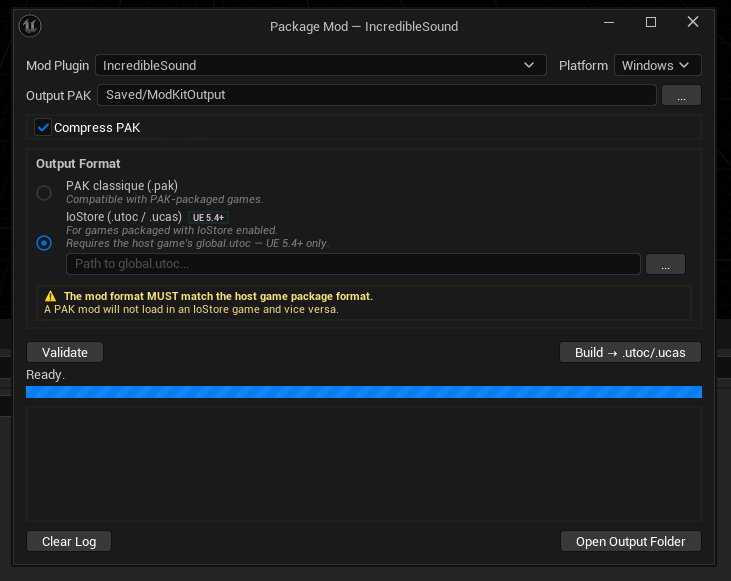
Package Window Options
| Option | Description |
|---|---|
| Mod | Select which installed mod to package |
| Output Directory | Where the .pak file will be written |
| Platform | Target platform: Windows, Mac, Linux |
| Compression | Enable Oodle compression (recommended — significantly reduces file size) |
Step 1 — Validate
Click Validate before building to catch issues early. ModKit checks:
ModDescriptor.jsonis present and well-formed- No hard references to
/Game/paths (asset overrides via PAK priority are fine; copy-pasting game assets is not) - No Blueprint compilation errors
- Dependencies are declared correctly
Hard References to /Game/
ModKit analyzes hard references from your mod's assets to the game's /Game/ content and reports them at three levels:
| Severity | Case | Build Blocked? |
|---|---|---|
| ✅ Safe | Referencing game types: Blueprints, structs, enums, DataAssets, DataTables, fonts. These resolve from the game's PAK at runtime and are never packaged into your mod. | No |
| ⚠️ Warning | Hard reference to a concrete game content asset (mesh, texture, material, sound, etc.) that is not copied into your mod. Prefer TSoftObjectPtr to avoid pulling the asset in, but the build is allowed — just verify it's intentional. | No |
| ❌ Error | A concrete content asset that has been physically copied into your mod's Content folder and is hard-referenced by another mod asset. This ships a redundant copy inside your PAK that bloats it and can drift out of sync if the game later updates the original. Reference the game asset with TSoftObjectPtr instead of copying it. | Yes |
Replacing a game asset by shipping your version at the same /Game/ path (PAK-priority override) is the intended workflow — there is a single asset at that path and yours wins. The error above is not about overriding; it's about carrying a redundant private copy of a game asset that your mod then references.
Step 2 — Build
Click Build to start the two-phase build pipeline:
Phase 1 — Collect & Validate (Game Thread)
- Queries the Asset Registry for all assets under
/Plugins/{ModId}/ - Validates assets (Blueprint compile check, hard reference scan)
- Writes an asset manifest file listing all assets to cook
Phase 2 — Cook, PAK, Inject (Background Thread)
- Cook — runs UAT (
BuildCookRun) to cook assets for the target platform - PAK — runs UnrealPak to bundle cooked assets into a
.pakfile- Compression applied if enabled
- Inject Descriptor — copies
ModDescriptor.jsonandModContributions.jsoninto the PAK - Finalize — sets
ReleaseDate/UpdatedDatetimestamps andPackageSizeBytes
Live Build Log
The build log panel streams real-time output from each stage. Look for:
[LogModKitBuild] Cook started for platform Windows[LogModKitBuild] Packaging to {OutputDir}/{ModId}_Windows.pak[LogModKitBuild] Build complete. Size: 12.4 MB
Output
On success, the packaged mod is written to your project's Saved folder:
MyProject/
└── Saved/
    └── {OutputDir}/
        └── my_awesome_mod/
            ├── my_awesome_mod.pak
            ├── ModDescriptor.json
            └── thumbnail.png
EModBuildResult
| Value | Description |
|---|---|
Success | Build completed successfully |
CompilationFailed | Blueprint or C++ compilation error |
CookFailed | UAT cook step failed (check log for details) |
PakFailed | UnrealPak step failed |
ManifestFailed | Could not write the asset manifest |
InvalidConfig | Build configuration is invalid |
ToolNotFound | UAT or UnrealPak not found (check UE installation) |
IoStoreNotSupported | IoStore requested but not available in this UE version |
Distributing Your Mod
Players drop the entire mod folder into the game's Mods directory. Mods sits at the same level as Content inside the game folder:
MyGame/
├── Content/
├── Mods/
│   └── my_awesome_mod/    ← drop the whole folder here
│       ├── my_awesome_mod.pak
│       ├── my_awesome_mod.ucas    (IoStore — UE 5.4+)
│       ├── my_awesome_mod.utoc    (IoStore — UE 5.4+)
│       ├── ModDescriptor.json
│       └── thumbnail.png
└── Saved/
The ModDescriptor.json must be present alongside the .pak. A PAK without a descriptor is silently skipped by the loader.
Updating Your Mod
When releasing an update:
- Update the
Versionfield in ModKit → Edit Mod - Make your changes
- Package again — the
UpdatedDatetimestamp is set automatically - Distribute the new
.pak— players replace the old file
Troubleshooting
Cook fails with "No assets found"
- Make sure your assets are saved under
/Plugins/{ModId}/Content/, not/Game/ - Check that the plugin is enabled in the Plugin Manager
UnrealPak not found
- ModKit looks for UnrealPak relative to the engine installation
- Verify your UE installation is complete (UnrealPak.exe is in
Engine/Binaries/Win64/)
Hard reference error on a game asset
- Remove any direct asset references to
/Game/paths from your Blueprints - If you're overriding an asset, use the same-path PAK approach, not a copy in your Content folder