Quick Start — Game Dev SDK
This guide walks you through the minimum integration to get mods loading in your game.
Step 1 — Configure Your Mods Directory
By default, ModKit scans a folder named Mods alongside your game's Content directory. You can change this name in Project Settings → Plugins → ModKit Runtime → Mods Directory.
In a packaged game build, the Mods folder sits alongside Content/, inside the game's project folder:
MyGame.exe
MyGame/
├── Binaries/
├── Content/          ← game content (untouched)
├── Mods/             ← create this folder
│   └── MyMod/        ← one subfolder per mod
│       ├── MyMod.pak
│       ├── MyMod.ucas          (IoStore — UE 5.4+ only)
│       ├── MyMod.utoc          (IoStore — UE 5.4+ only)
│       ├── ModDescriptor.json
│       └── thumbnail.png       (optional)
└── Saved/
Each mod is distributed as a folder. Players drop the entire mod folder into Mods/.
ModKit reads ModDescriptor.json from the same directory as the .pak before mounting it. A .pak without a descriptor is skipped.
Step 2 — Bind Delegates
Before calling StartLoadMods(), bind the delegates you care about on UModLoaderSubsystem. This ensures your game receives events as each mod loads.
Blueprint
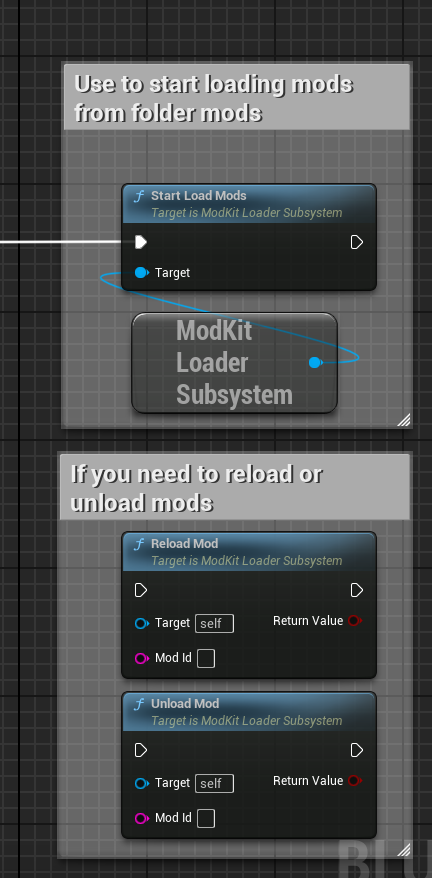
In your GameInstance Init event or Loading Screen Begin Play:
- Get the
ModLoaderSubsystemnode - Bind OnModStartLoading, OnModLoaded, OnModLoadFailed, OnAllModsLoaded events
- Call
StartLoadMods
C++
#include "ModLoaderSubsystem.h"

void UMyGameInstance::Init()
{
    Super::Init();

    UModLoaderSubsystem* ModLoader = GetSubsystem<UModLoaderSubsystem>();
    if (ModLoader)
    {
        ModLoader->OnModStartLoading.AddUObject(this, &UMyGameInstance::OnModStartLoading);
        ModLoader->OnModLoaded.AddUObject(this, &UMyGameInstance::OnModLoaded);
        ModLoader->OnModLoadFailed.AddUObject(this, &UMyGameInstance::OnModLoadFailed);
        ModLoader->OnAllModsLoaded.AddUObject(this, &UMyGameInstance::OnAllModsLoaded);
    }
}
Step 3 — Call StartLoadMods
StartLoadMods() is never called automatically — you must call it explicitly at the right moment in your game flow.
Always bind your delegates before calling StartLoadMods(). If you call it first, you may miss OnModLoaded events for mods that load synchronously.
Recommended location: in your loading screen or main menu initialization, after your game world has fully initialized.
Blueprint
Event BeginPlay
  → Get ModLoaderSubsystem
  → Bind delegates (see above)
  → StartLoadMods
C++
void UMyLoadingScreen::NativeConstruct()
{
    Super::NativeConstruct();

    UModLoaderSubsystem* ModLoader = GetGameInstance()->GetSubsystem<UModLoaderSubsystem>();
    if (ModLoader)
    {
        // Delegates already bound in GameInstance::Init
        ModLoader->StartLoadMods();
    }
}
Step 4 — Handle Events
OnAllModsLoaded
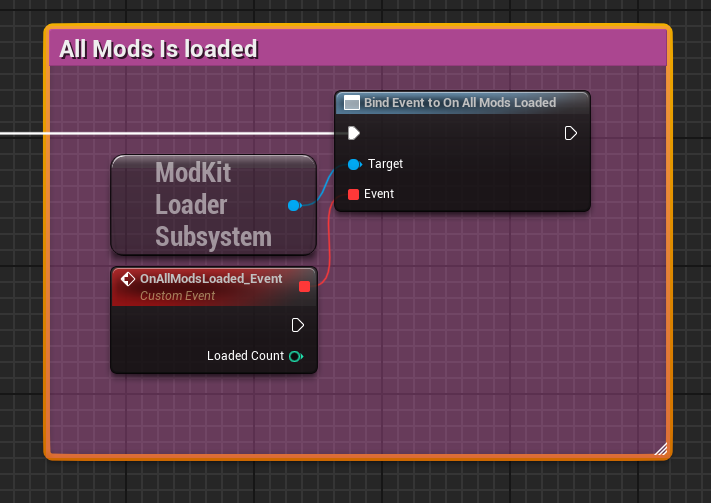
Called once after all mods have finished loading (or failed). Use this to proceed to your main menu or game world.
void UMyGameInstance::OnAllModsLoaded()
{
    TArray<FModDescriptor> Mods = ModLoader->GetLoadedMods();
    UE_LOG(LogTemp, Log, TEXT("Loaded %d mods"), Mods.Num());

    // Proceed to main menu
    GetWorld()->ServerTravel("/Game/Maps/MainMenu");
}
OnModLoaded
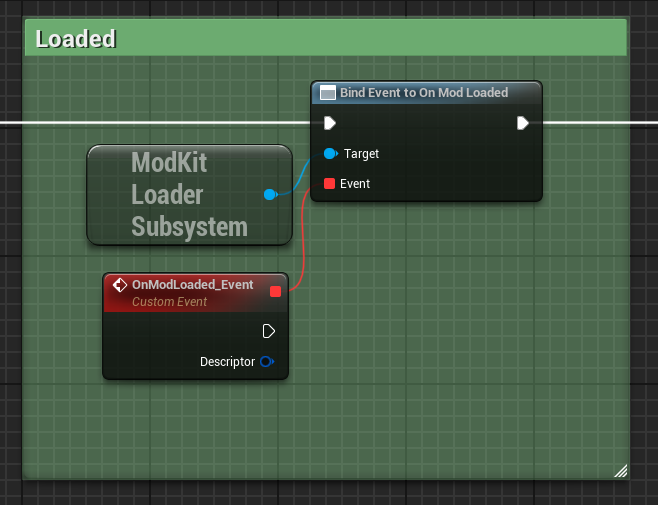
Called for each successfully loaded mod. Useful for showing per-mod progress in a loading UI.
void UMyGameInstance::OnModLoaded(const FModDescriptor& Mod)
{
    UE_LOG(LogTemp, Log, TEXT("Mod loaded: %s v%s by %s"),
        *Mod.DisplayName, *Mod.Version, *Mod.Author);
}
OnModStartLoading
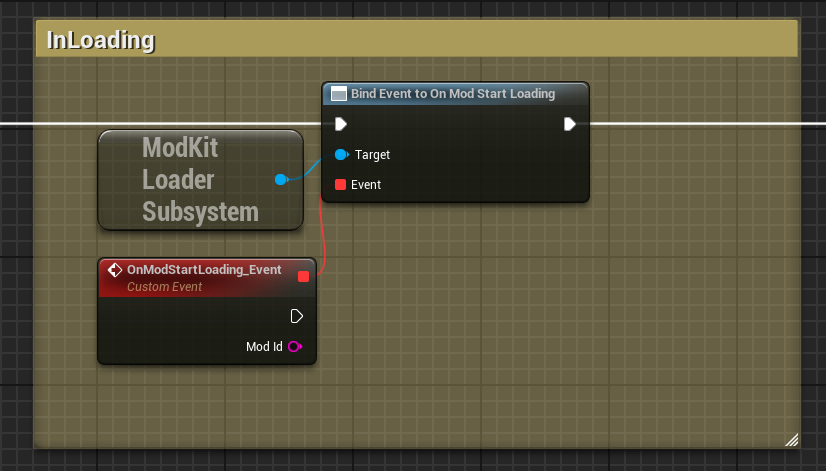
Called just before a mod begins mounting. Useful to show a "Loading: ModName..." message in a loading UI.
void UMyGameInstance::OnModStartLoading(const FString& ModId)
{
    UE_LOG(LogTemp, Log, TEXT("Loading mod: %s"), *ModId);
}
OnModLoadFailed
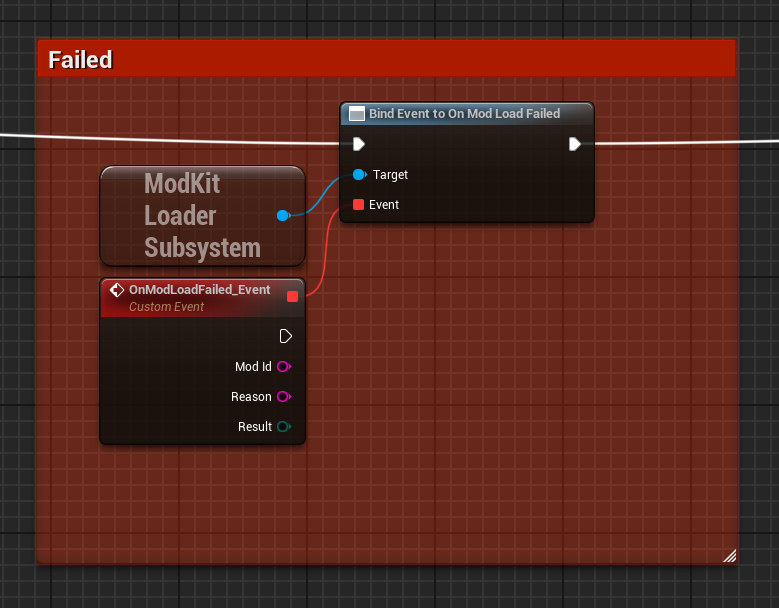
Called when a mod fails to load. The mod is skipped — your game continues.
void UMyGameInstance::OnModLoadFailed(const FString& ModId, const FString& Reason, EModLoadResult Result)
{
    UE_LOG(LogModKitLoader, Warning, TEXT("Mod %s failed (%s): %s"),
        *ModId, *UEnum::GetValueAsString(Result), *Reason);
}
Full Example Flow
Game Launch
  └─ GameInstance::Init()
       └─ ModLoaderSubsystem → StartLoadMods()
            │
            ├─ Scans Mods/ for mod folders
            ├─ Validates each mod (descriptor, version, dependencies)
            ├─ Sorts by dependency order
            └─ Mounts each PAK (priority 100 — shadows /Game/ content)

Loading Screen
  └─ BeginPlay / NativeConstruct
        ├─ OnModStartLoading ───→ show progress
        ├─ OnModLoaded ─────────→ update loading UI
        ├─ OnModLoadFailed ─────→ log warning, skip mod
        │
        └─ OnAllModsLoaded ─────→ Main Menu
Querying Loaded Mods
After loading, use UModLoaderSubsystem to query mods at runtime:
UModLoaderSubsystem* ModLoader = GetGameInstance()->GetSubsystem<UModLoaderSubsystem>();

// Get all loaded mods
TArray<FModDescriptor> Mods = ModLoader->GetLoadedMods();

// Check if a specific mod is loaded
bool bHasMod = ModLoader->IsModLoaded("my_mod_id");

// Search mods by name/author
TArray<FModDescriptor> Results = ModLoader->SearchMods("my search query");

// Filter by tag
TArray<FModDescriptor> TaggedMods = ModLoader->GetModsByTag("gameplay");
Next Steps
→ Configuration — Full settings reference
→ Content Registry — Class overrides and DataTable merging
→ Security — Native-code rejection & version checks