Installation — Mod Creator
ModKit — Mod Creator is the free plugin for creating mods for games powered by ModKit SDK.
Requirements
- Unreal Engine 5.1 or later
- The game you're modding must also use ModKit SDK
- Windows (Win64)
Download
Install
- Extract the downloaded archive
- Copy the
ModKit_Authoringfolder into the Plugins folder of your UE project:
MyModProject/
└── Plugins/
    └── ModKit_Authoring/    ← drop it here
If the Plugins folder doesn't exist, create it at the root of your project.
Enable the Plugin
- Open your project in Unreal Engine
- Go to Edit → Plugins
- Search for ModKit
- Enable ModKit — Mod Creator and restart the Editor when prompted

Use a Dedicated Mod Project
Create a blank UE project just for modding. This keeps your mod content isolated from any other work.
Verify Installation
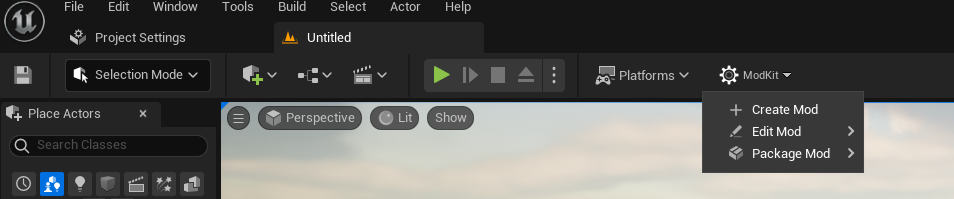
After restarting, you should see a ModKit button in the main Editor toolbar. Clicking it shows:
- Create Mod — open the new mod wizard
- Edit Mod — edit an existing mod's metadata
- Package Mod — build and package a mod to
.pak
What You'll Need From the Game Developer
Before creating content, you'll need:
- Mod documentation — what assets you can override, DataTable structures, etc.
- Game version string — to set the correct
MinGameVersionin your mod