Editing Mod Metadata
Use ModKit → Edit Mod → {Your Mod} to edit your mod's identity and contribution declarations through a UI without touching JSON files directly.
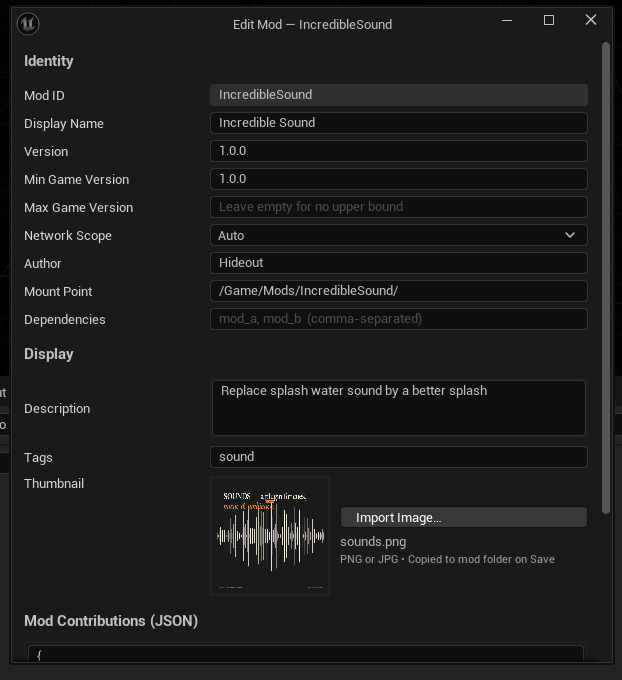
Identity Section
| Field | Description |
|---|---|
| Mod ID | Read-only after creation |
| Version | Update this on every release (SemVer: 1.0.0, 1.1.0, 2.0.0) |
| Min Game Version | Minimum game version required. Players on older game builds will see an error. |
| Max Game Version | Maximum game version supported (optional). Players on a newer game build will see an error. Useful when a newer game version introduces breaking changes. |
| Mount Point | Where in the virtual filesystem your mod's content is accessible. Auto-generated as /Game/Mods/\{PascalCaseModId\}/ |
| Dependencies | Comma-separated list of ModIds this mod requires to be loaded first |
Display Section
| Field | Description |
|---|---|
| Display Name | Shown in the in-game mod manager |
| Description | Short description shown to players |
| Tags | Comma-separated. Must match the game's allowed tag vocabulary |
| Thumbnail | Path to a 256×256 PNG. Preview is shown in the dialog |
Raw JSON Editor
The bottom panel shows the raw ModContributions.json content. You can edit it directly here for advanced use cases.
Increment the version every time you publish an update. Players' mod managers use this to show update notifications. Use SemVer:
- Patch (
1.0.0 → 1.0.1) — bug fixes, minor tweaks - Minor (
1.0.0 → 1.1.0) — new content, new features - Major (
1.0.0 → 2.0.0) — breaking changes to your public API
ModDescriptor.json Format
The full ModDescriptor.json schema:
{
  "ModId": "my_awesome_mod",
  "DisplayName": "My Awesome Mod",
  "Version": "1.0.0",
  "Author": "YourName",
  "Description": "Adds new weapons and balances existing ones",
  "MinGameVersion": "1.0.0",
  "MaxGameVersion": "",
  "MountPoint": "/Game/Mods/MyAwesomeMod/",
  "Dependencies": [],
  "CppModuleNames": [],
  "Tags": ["gameplay", "weapons"],
  "ThumbnailPath": "Content/Thumbnail.png",
  "ReleaseDate": "2026-05-24T00:00:00Z",
  "UpdatedDate": "2026-05-24T00:00:00Z",
  "PackageSizeBytes": 0
}
ReleaseDate, UpdatedDate, and PackageSizeBytes are automatically set by the build pipeline when you package.
Dependencies
If your mod requires another mod to be loaded first, add its ModId to the Dependencies array:
{
  "Dependencies": ["base_content_mod", "shared_library_mod"]
}
The game's mod loader will:
- Sort mods by dependency order
- Reject your mod with
EModLoadResult::MissingDependencyif a required mod isn't present - Detect circular dependencies and reject the chain
If your mod uses assets or Blueprint classes from another mod, always declare that mod as a dependency. Otherwise, players who don't have the dependency will see load failures.